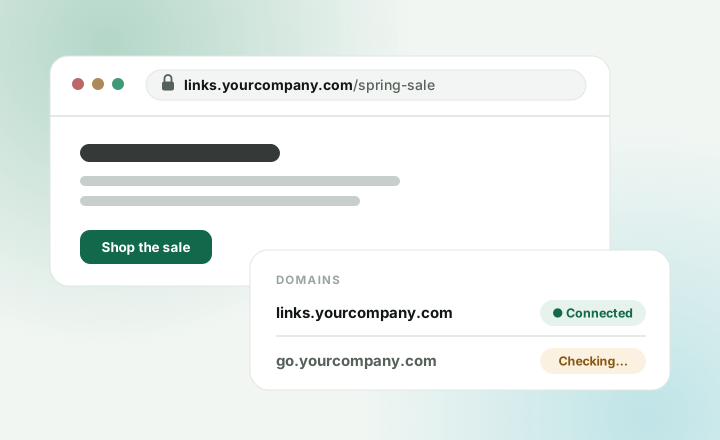
Links on your own name get clicked more, because people can see who sent them. On Pro you can connect up to 3 of your own domains.
Before you start
You need:
- A domain you own, like
yourcompany.com. - A login for the site where you bought it, like GoDaddy, Namecheap, Squarespace or Cloudflare.
Use a subdomain, like
links.yourcompany.comorgo.yourcompany.com. Your main website keeps working as it is.
Connect it
- Open Domains in your dashboard.
- Press Add domain and type the address, like
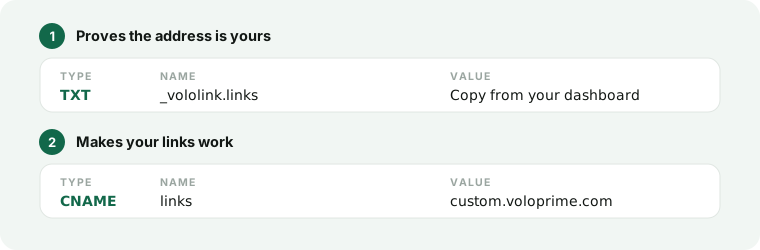
links.yourcompany.com. Leave outhttps://. - We show you two records. Keep this page open.
- In another tab, sign in where you bought your domain. Open its DNS settings. It may be called “DNS records” or “Manage DNS”.
- Add both records. For each one, press Add record, pick the Type, copy in the Name and Value, and save.
- Come back and press Check again.
It usually works within a few minutes. Sometimes it takes a few hours. When it’s ready, the domain shows Connected.
Using Cloudflare?
On record 2, click the orange cloud so it turns grey (“DNS only”). If your links ever fail to load, check this first.
Use it
When you make a new link, pick your domain under Domain. In Import links, you can pick it for a whole batch at once.
If you stop Pro
Links on your domain keep working for 7 days, then stop until you resubscribe. Your links on our domain keep working.